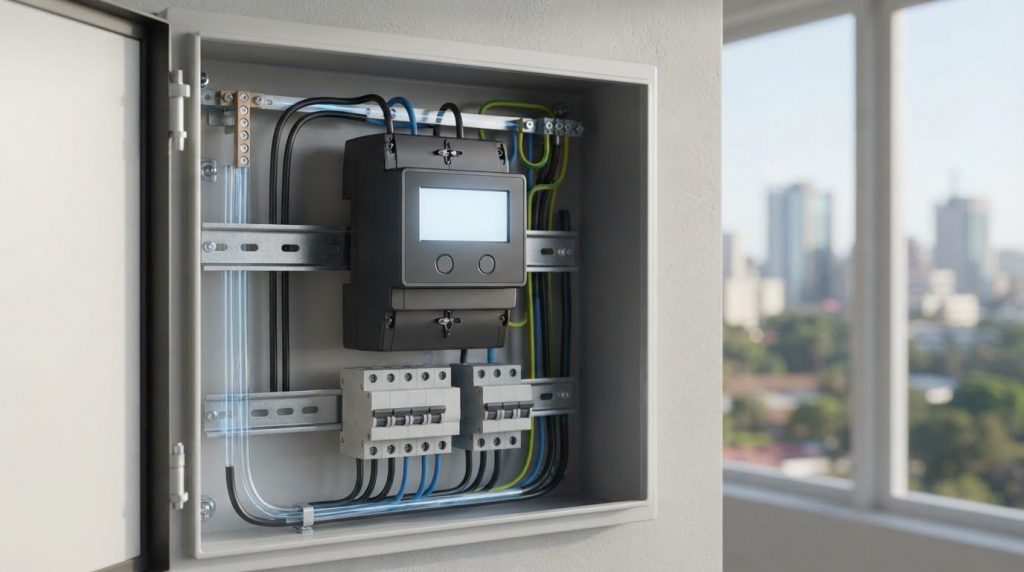
DIN rail prepayment meter
The key difference is physical and practical: a DIN rail prepayment meter mounts on a DIN rail, while prepayment means electricity credit is loaded before use. Traditional meters generally record consumption for later billing. The comparison is therefore about mounting format and payment method, not simply how electricity is measured.
Choosing a meter involves more than swapping one device for another. Consider how it fits the distribution setup, the enclosure protection required, and whether token-based or smart prepaid operation suits the way you manage electricity.
This guide explains how DIN rail and traditional meters differ, how prepaid options work, and which specifications affect selection. Use it to narrow down a setup for a property or electrical system in Kenya.
Key Takeaways
- Match the meter’s rail-mounted format to the distribution box and the other devices in the electrical setup.
- Compare token-based credit loading with smart prepaid features to choose an approach that fits how users manage electricity.
- Use the stated temperature range and IP protection rating to assess whether the meter suits its intended environment.
- Separate electricity metering needs from water monitoring needs when comparing available meter options.
DIN rail mounting and enclosure protection
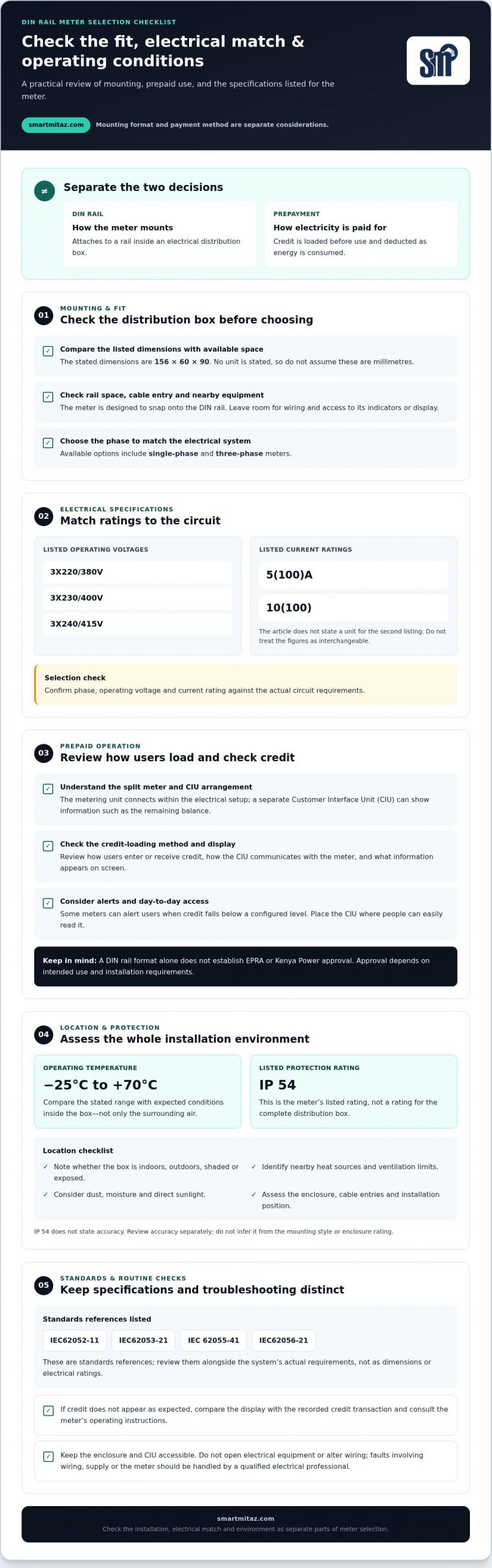
A DIN rail meter attaches to a rail inside an electrical distribution box. Its compact form supports measurement alongside other distribution devices. The listed dimensions are 156*60*90. Compare these measurements with the available mounting space, cable entry points, and nearby equipment before selecting a unit. The dimensions have no stated unit here, so don’t assume they represent millimetres.
DIN rail mounting uses the rail as the meter’s physical support. Designed to snap onto the rail, the meter does not require a separate complex fixing process. In a distribution box, this can make it easier to arrange alongside related equipment. Leave space for wiring and access to the meter’s indicators or display. A tight fit can make operation and inspection less practical.
Available phase options include single-phase and three-phase meters. Listed operating voltages are 3X220/380V, 3X230/400V, and 3X240/415V. The listed current ratings are 5(100)A and 10(100). Match the selected meter’s phase, voltage, and current specifications to the electrical system; these figures should not be treated as interchangeable.
Protection matters because the meter sits within an enclosure that may also contain wiring and switching equipment. The listed protection rating is IP 54. Treat that rating as a defined product specification, not as permission to place the meter in any environment. The enclosure, installation position, and exposure to dust or moisture all affect suitability.
- Measure the available rail and compare it with the meter dimensions.
- Confirm the distribution box can accommodate wiring and access.
- Match phase, operating voltage, and current rating to the circuit.
The specification also lists IEC62052-11, IEC62053-21, IEC 62055-41 and IEC62056-21. These identifiers help distinguish the stated standards references from physical dimensions or electrical ratings. Review them alongside the meter’s actual system requirements. For a Nairobi distribution box, plan the DIN rail mounting around the enclosure layout, connected devices, and the meter’s required electrical configuration.
Prepaid operation with a Customer Interface Unit
A prepaid meter deducts electricity credit as energy is used. In a split design, the metering unit connects within the electrical distribution setup, while a Customer Interface Unit (CIU) provides a separate point for viewing information. This can keep routine credit checks away from the distribution box. The CIU display can show the remaining balance, helping users track their available credit.
Credit is loaded before consumption. Depending on the system, users add prepaid credit and monitor the balance through the CIU. Some prepaid meters can alert users when credit falls below a configured level, prompting residents or property managers to top up before it runs out. Users still need to understand the meter’s specific credit-loading method.
For convenience, place the CIU where users can easily access and read its display. A property manager, for example, may want to check the remaining credit without opening an electrical distribution box. Review how the CIU communicates with the meter, how users enter or receive credit, and what information appears on screen. These details affect daily use more than the rail-mounted format alone.
A DIN rail format alone does not establish whether a meter is approved or regulated by EPRA or Kenya Power. Approval depends on the meter’s intended use and the requirements for that installation.
In Kenya, look for the meter through an electrical metering supplier that provides prepaid options suited to the intended system. Compare its phase, credit-loading method, CIU arrangement, and displayed balance before selecting it.
Common operational issues include a balance users do not understand, credit that does not appear as expected, or a CIU display that is difficult to read. Start with the meter’s operating instructions and compare the display with the recorded credit transaction. Keep the enclosure and CIU accessible for inspection, and do not open electrical equipment or alter wiring. Leave faults involving wiring, supply, or the meter itself to a qualified electrical professional. Review credit records and displayed balances regularly to spot discrepancies early.
Operating temperature and protection rating
Check the stated operating range before choosing a meter location. The listed range is -25°C to +70°C. It describes the temperatures under which the meter is designed to operate. For a distribution box, consider its position, ventilation, and nearby heat sources. Conditions inside an enclosure can differ from the surrounding room or outdoor air.
Protection is a separate selection check. The listed rating is IP 54. Use that figure as a specification for the meter, not as a rating for the entire distribution box. The enclosure, cable entries, and installation position also affect the finished assembly. A meter’s IP rating alone doesn’t establish suitability for every location.
For a Nairobi property, identify where the meter will sit before comparing specifications. A shaded indoor distribution box and an exposed outdoor cabinet present different conditions. Consider possible dust, moisture, direct sunlight, and heat from nearby electrical equipment. Compare these conditions with the product’s operating range and protection rating.
Keep temperature, ingress protection, and measurement accuracy distinct. IP 54 does not state the meter’s accuracy. Review the accuracy specification separately, alongside the electrical system requirements. For a single phase installation, confirm that the selected meter matches the circuit and intended measurement use. Don’t infer accuracy from the mounting style or enclosure rating.
Use a simple location review before selecting a unit:
- Record whether the box is indoors, outdoors, shaded, or exposed.
- Identify nearby heat-producing equipment and ventilation limits.
- Compare the meter’s -25°C to +70°C range with expected conditions.
- Assess the complete enclosure, including openings and cable entries.
- Review accuracy separately from the IP 54 protection rating.
These checks help avoid treating one specification as a substitute for another. For example, a meter that fits the rail still needs an appropriate operating environment. Likewise, an IP 54 marking doesn’t tell you whether the meter’s measurement accuracy meets the application. Document the location and required performance, then compare each specification against that use.
When selecting a DIN rail prepayment meter, assess the complete installation. Match the temperature range to expected conditions, assess the enclosure, and verify accuracy independently. This gives property managers and electrical planners a practical basis for choosing equipment for a Nairobi site.
Token-based and smart prepaid meters
Prepaid options vary in how users load credit and monitor electricity use. Compare the loading method, display, and remote-monitoring needs before choosing a meter.
Token-Based and Smart Meter Types
With token-based meters, users obtain a token from a vending machine or retailer and enter it into the meter to add credit. Smart prepaid meters can use internet connectivity for remote monitoring and real-time data analysis. These are different operating approaches, not simply different mounting formats.
In Kenya, compare token-based and connected smart options, then match the meter’s phase to the electrical system. Single-phase DIN rail meters measure consumption in single-phase systems. A smart option may suit property managers who need remote visibility, while a token-based approach may suit users who prefer entering purchased credit directly. Choose according to how users will load credit and monitor consumption.
Loading Tokens or Credit
For token-based operation, obtain a token through the applicable vending machine or retailer. Enter it using the meter’s supported input method, then check the credit display to confirm the balance. Follow the meter’s instructions, as the exact process depends on its interface.
Smart prepaid systems provide connected monitoring, while prepaid operation still relies on credit loaded before electricity use. Review how the selected system accepts credit and displays the remaining balance. A clear process helps users track usage and plan top-ups without relying on estimates.
Prepayment can reduce the likelihood of unpaid electricity bills, while visible balances can encourage more deliberate energy use. For property administrators, connected monitoring can support remote review and data analysis. These benefits depend on choosing an operating type that fits the users and the property’s credit-management process.
Before choosing, compare these points:
- Token entry versus internet-connected monitoring.
- Single-phase or other required system configuration.
- How users view credit and track consumption.
- Whether remote data access is useful for property management.
Choose a token-based setup for direct token entry, or a smart option when remote monitoring is useful. Then confirm the meter’s phase and credit workflow suit the installation. For water monitoring rather than electricity prepayment, compare smart water meter options separately.
Smartmitaz: Outdoor 4G-LoRa water meter gateway
smartmitaz offers an Outdoor 4G-LoRa water meter gateway for water-monitoring setups that need gateway connectivity. It serves a different purpose from a DIN rail electricity prepayment meter, so choose according to whether your requirement is electricity credit management or water meter data connectivity.
For water metering, smartmitaz also offers a Residential Smart Prepayment Water Meter and a Commercial/Residential Smart Prepayment Water Meter. These options are relevant for managing water consumption in residential or commercial settings. Keep the requirement clear: electricity measurement and prepaid credit call for an electricity meter, while water monitoring calls for water-meter equipment.
Review your property’s metering need, then explore the relevant water-meter option with smartmitaz. Contact smartmitaz to discuss its water-meter offerings or visit smartmitaz.com.
Turn your meter requirements into a clear next step
Before choosing a DIN rail prepayment meter, turn the site requirements into a brief equipment plan. Record the intended use, who will manage credit, and what information users need during routine operation. Include the electrical configuration and installation constraints so the choice suits the site, not just a product label. A consistent plan also helps property teams compare requirements across sites and plan future equipment decisions.
For electricity applications, smartmitaz offers a Single Phase Smart Prepayment Meter and a Three Phase Smart Prepayment Meter. For water monitoring, it offers an Outdoor 4G-LoRa water meter gateway. These options address distinct metering needs, so start with the utility and operational task you need to support.
Share your requirements with smartmitaz to discuss suitable meter options. Contact smartmitaz about meter options and move forward with a defined equipment plan.
Frequently Asked Questions
What are the differences between DIN rail energy meters and traditional energy meters?
The main difference is the mounting format and intended position in an electrical setup. A DIN rail meter attaches inside a distribution box, while traditional meters may use other enclosure or mounting arrangements. Both can measure electricity consumption; mounting style alone does not determine whether a meter is prepaid, its accuracy, or how users access readings. Compare the meter’s electrical configuration with the site requirements.
What is a DIN rail prepayment electricity meter and how does it work?
A DIN rail prepayment meter is designed for DIN rail mounting and uses prepaid credit. Users load credit before consumption, and the meter deducts it as electricity is used. For example, a property manager can allocate credit to a metered unit and track the balance through the meter’s display or interface. This separates payment timing from the meter’s physical mounting format.
How does a DIN rail prepaid meter compare with a plug-in or conventional prepaid meter?
A DIN rail prepaid meter mounts inside a distribution box, while a plug-in meter connects through a socket. A conventional prepaid meter may use another fixed mounting arrangement. The prepaid purpose can be similar: credit is loaded before use. Choose based on where the device must connect, whether it needs to integrate with the distribution setup, and how users will access its readings.
[…] offers the Single Phase Smart Prepayment Meter and the separately named DIN rail Single Phase Smart Prepayment Meter. Compare each with the property’s documented phase and form-factor requirements. Neither the […]